Dragon the Dragon Guide: Controls, Flying Tips and Missions
Dragon the Dragon is a free browser action-platformer by Mibbon on Poki: you train a young dragon to fly, grab and breathe fire, take on missions around a city, and rescue a friend from the boss dragon. Here is everything you need to start strong.
Quick facts
| Developer | Mibbon |
|---|---|
| Genre | Adventure / action platformer |
| Released | October 2026 (updated Nov 2026) |
| Platforms | Browser — desktop, phone, tablet |
| Price | Free on Poki |
| Poki rating | 4.0 (11,000+ votes) |
| Official site | Play free on Poki |
Where to play
Play Dragon the Dragon on Poki
Poki does not provide embeds for other sites, so we link to the official page. It runs on desktop, phone and tablet browsers.
What is Dragon the Dragon?
Dragon the Dragon is a browser game by Mibbon, published on Poki. Poki describes it two ways: as an adventure in a fantasy world of mystical lands, and as a platformer where you train your dragon to fly, grab and breathe fire across action-packed levels. The story is simple — your friend has been captured by the boss dragon, and you have to master your abilities, dominate the skies and bring them back. Along the way you complete missions and, in the official words, "go on a full city rampage."
Mibbon's own site describes the studio as having more than 20 years of game development experience, with roots in premium games, now making free-to-play browser titles. Its other Poki game is Dino Simulator. Mibbon's tagline for this one: "Big wings. Bigger adventures."
Poki lists an October 2026 release, an update in November 2026, support for desktop, phone and tablet, and a 4.0 rating from more than 11,000 votes when we checked on 11 November 2026. The build we loaded showed version 0.27.206 on its loading screen, which suggests the game is still being actively developed.
How to start
- Open the official Poki page and wait for the loading bar to reach 100%.
- Press the big GO button on the title screen.
- Follow the first missions — they are where the game teaches flying, grabbing and fire.
- Practice each of the six actions once before you try anything fast.
- Work through missions toward the boss dragon who captured your friend.
The game saves through your browser, so play on the same device and browser if you want to continue later.
Controls
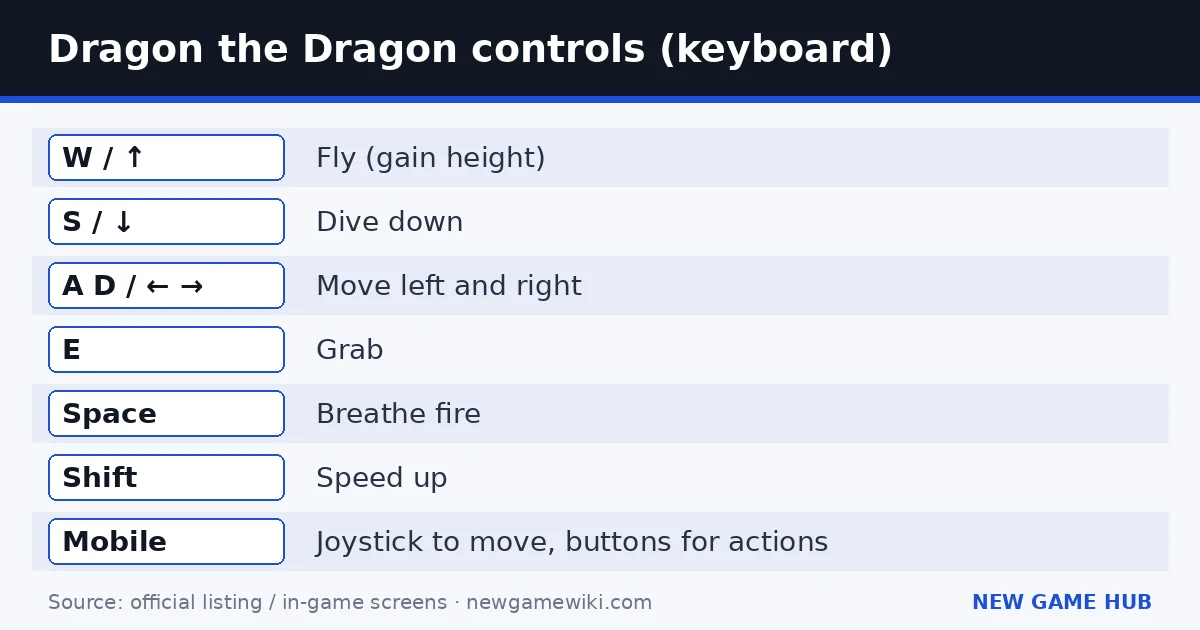
These are the official controls from the Poki page.
| Action | Keyboard | Mobile |
|---|---|---|
| Fly (gain height) | W or ↑ | Joystick up |
| Dive down | S or ↓ | Joystick down |
| Move left / right | A / D or ← / → | Joystick left / right |
| Grab | E | On-screen button |
| Breathe fire | Space | On-screen button |
| Speed up | Shift | On-screen button |
Poki's summary: move around with WASD or the arrow keys, grab items with E, spew fire with Space, and speed up with Shift. On mobile, use the joystick to move and tap the buttons for the other actions.
Tips for flying, grabbing and fire
Flying
- Height is your friend. W or ↑ gains height; being above a target gives you time to line up a dive or a grab.
- Dive with purpose. S or ↓ drops you quickly. Use it to swoop at something, then climb back up.
- Use Shift on straight lines only. Speed makes turns and precise grabs harder. Boost across open space, release it before you arrive.
Grabbing
- Grab is its own skill. E is a separate control, so expect missions that are about carrying or moving things, not only burning them.
- Approach slowly. Line up above or beside the object, then press E. A missed grab at full speed sends you past the target.
- Carry, then fly. Once you have something, gain height before moving so you do not clip buildings.
Fire
- Space is your attack. Use fire when a mission asks you to destroy or clear something, or when enemies get in the way.
- Aim with your body. Fire comes from the dragon, so face the target and keep a steady line.
- Mind the city. The official description promises a city rampage, but read each mission's goal — not every mission is about destroying everything.
General
- Read the objective on screen before you fly off. Missions are short; doing the right thing slowly beats doing the wrong thing fast.
- Learn the six keys in a calm area first. Space and Shift are easy to press by accident.
- On a phone, use landscape to give the joystick and buttons room.
Beginner mistakes
- Holding Shift all the time and overshooting every target.
- Flying low through the city and crashing into buildings.
- Trying to burn an object when the mission wants you to grab it.
- Skipping the early missions that teach the controls.
- Pressing Space for jump out of habit — in this game Space is fire, and W is up.
- Playing a reupload on another site with an old version instead of the official Poki page.
Dragon the Dragon codes
Last checked: 11 November 2026. Dragon the Dragon has no codes. Neither the Poki listing nor Mibbon's website mentions a code system. The game is completely free on Poki.
Dragon the Dragon vs similar games
| Game | What you do | Platform | Notes |
|---|---|---|---|
| Dragon the Dragon | Fly, grab and breathe fire through city missions | Browser (Poki) | Free, short missions, mobile support |
| Dino Simulator (also by Mibbon) | Survive as a T. rex or Triceratops | Browser (Poki) | Same studio, open exploration |
| Spyro the Dragon (1998) | 3D platformer with fire breath and gliding | Console | The classic dragon platformer — a full console game, not a browser game |
If you enjoy Dragon the Dragon, Mibbon's Dino Simulator is the natural next pick from the same developer.
Platforms and system requirements
- Browser on Poki: desktop, phone and tablet. Free, no download.
- No app store version is listed on Poki or on mibbon.com.
No system requirements are published. It is a 3D game, so a recent browser on a reasonably modern computer or phone gives the smoothest flying. On desktop, a keyboard is required for the official key layout. The developer's privacy policy for the game is at mibbon.com/privacy/dragon-the-dragon.html.
Playing Dragon the Dragon on a phone or tablet
Poki supports Dragon the Dragon on phones and tablets with an on-screen joystick for movement and buttons for the other actions. A few habits make touch play easier:
- Turn your phone sideways. Landscape leaves room for the joystick on one side and the action buttons on the other.
- Use short joystick pushes for height. Small corrections are easier than holding the stick all the way up.
- Tap actions rather than holding them, unless you want continuous fire or speed.
- Close other apps if the 3D city stutters.
If you have both options, desktop with a keyboard gives the most precise control for grabbing small objects.
About the developer, Mibbon
Mibbon describes itself as "serious about monkey business": a studio with more than 20 years of game development experience whose roots are in premium games and which now brings "that same care and craftsmanship" to free browser games. Its games are aimed at "the young, and the young at heart." Mibbon currently lists two titles on its site, both playable on Poki: Dino Simulator, where you live as a T. rex or Triceratops, hunt, find water and protect your family, and Dragon the Dragon. Both run on desktop, phone and tablet.
FAQ
How do you fly in Dragon the Dragon?
Press W or the up arrow to fly up, S or the down arrow to dive, and A/D or the left/right arrows to move. Shift speeds you up.
How do you breathe fire?
Press Space on a keyboard, or tap the matching on-screen button on mobile.
How do you grab things?
Press E on a keyboard, or tap the matching on-screen button on mobile.
What is the story of Dragon the Dragon?
Your friend has been captured by the boss dragon. You complete missions and master flying, grabbing and fire to rescue them.
Who made Dragon the Dragon?
Mibbon, a studio that also made Dino Simulator on Poki.
Is Dragon the Dragon free and does it work on mobile?
Yes on both counts. It is free on Poki and supports phones and tablets with a joystick and on-screen buttons.
Are there Dragon the Dragon codes?
No. As of 11 November 2026 the game has no codes.
Related guides
 Country Balls World War guide
 Toy Repair Shop guide
 Nuke Policy guide
 The Last Ember guide
 Paint to Hide guide
 Lawn Mower Idle guide
- Country Balls World War guide — Pick a country, drag your army onto your neighbors, and try to hold the whole globe — controls, tips and what to avoid.
- Toy Repair Shop guide — Repair, clean and customize customers’ toys in a cozy workshop — how the loop works plus tips and decorating ideas.
- Nuke Policy guide — Spread out, build cities and factories, and hold 85% of the map before the bots — with real build costs from our test game.
- The Last Ember guide — A free browser survivors-like: auto-attacks, five-minute runs, evolutions, three heroes and three endings.
- Paint to Hide guide — Paint yourself to match the scenery, lock in place, and outlast the hunters — controls and tips for both sides.
- Lawn Mower Idle guide — Mow, earn Gold, upgrade, and prestige — the full starting upgrade list with costs and an efficient order.
Sources: Poki — Dragon the Dragon · Mibbon — official site
Unofficial fan guide. Dragon the Dragon is developed by Mibbon and published on Poki. We are not affiliated with either.