Paint to Hide Guide: Controls, Best Hiding Tips and Hunter Strategy
Paint to Hide is a free multiplayer hide-and-seek game by motionman games on CrazyGames: hiders paint their bodies to match the map and freeze in place, while hunters search with water guns. We joined a live round to check how it plays.
Quick facts
| Developer | motionman games |
|---|---|
| Genre | Multiplayer hide and seek |
| Released | August 2026 (updated Nov 2026) |
| Platforms | Browser (desktop, mobile, tablet), CrazyGames app |
| Engine | HTML5 |
| Rating | 9.0 on CrazyGames (80K likes) |
| Official site | Play free on CrazyGames |

Where to play
Play Paint to Hide on CrazyGames
CrazyGames' current terms do not offer embedding on other websites, so we link to the official game page.
What is Paint to Hide?
Paint to Hide (listed as Paint to Hide!) is an online hide-and-seek game from motionman games, published on CrazyGames. The official one-line pitch says it all: paint your body to match the environment, find a hiding spot, and stay still while the seeker hunts players with a water gun.
It is one of the most popular new games on the platform. When we checked on 11 November 2026, CrazyGames showed a 9.0 rating with about 80,000 likes, a release in August 2026 and an update on 11 November 2026. It runs on HTML5 in desktop, mobile and tablet browsers and in the CrazyGames app on iOS and Android, in landscape orientation.
The twist compared with classic prop-hunt games is that you do not turn into an object. You stay a person-shaped figure and paint yourself with the colors of the wall, floor or shelf behind you. Good painting plus a smart pose and total stillness is what keeps you alive.
How a round works
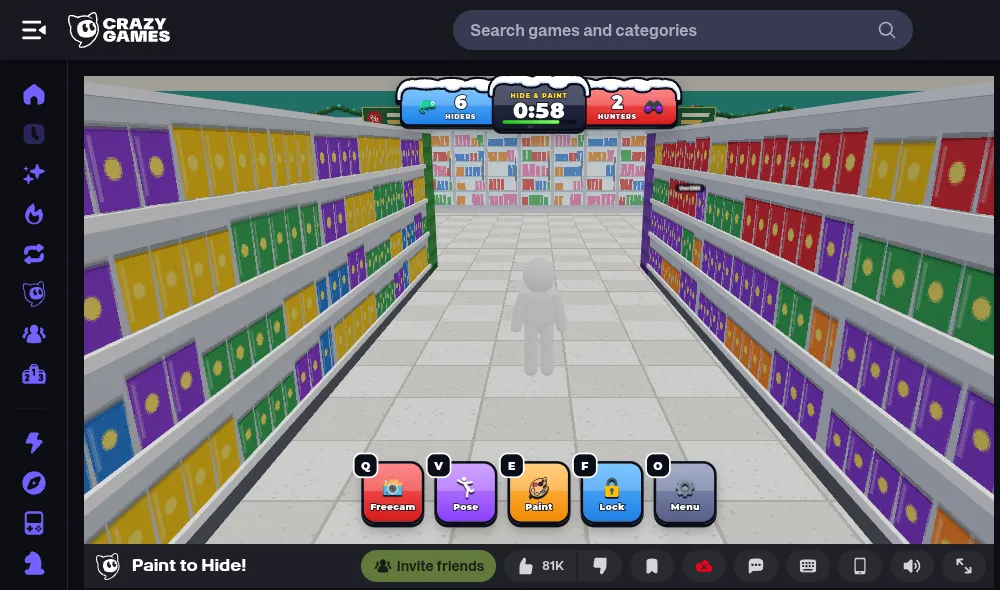
When we joined, the round opened in a supermarket map — long aisles of brightly colored shelves — with a HUD at the top reading 6 Hiders versus 2 Hunters and a Hide & Paint countdown starting at about one minute. Your character starts plain white, which stands out on almost every surface, so the countdown is the time you have to disguise yourself.
A round, step by step:
- Hide & Paint phase. Hiders run, climb and paint. Hunters wait for the search to begin.
- Pick a spot. Find a place whose colors you can copy easily — a single-color wall is easier than a shelf full of packets.
- Paint. Press E for paint mode and left-click surfaces to copy their color onto your body.
- Pose and lock. Press V for a pose that fits the spot, then F to lock your position so a stray key press cannot give you away.
- Survive the search. Hunters roam with water guns and shoot anything suspicious. The hiders’ goal is to stay unseen until the search ends.
Round length, player counts and maps can vary with the server and updates; the numbers above are what we saw in one round.
Controls
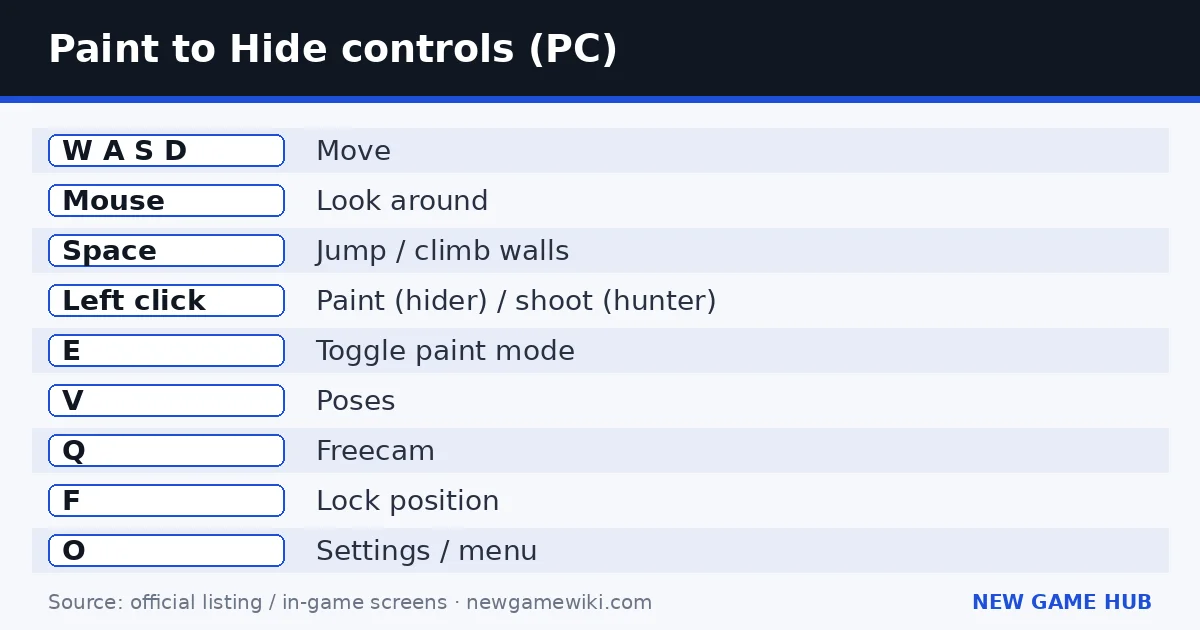
These are the official PC controls from the CrazyGames page. The same actions appear as on-screen buttons (Freecam, Pose, Paint, Lock, Menu) during a round, which is how you play on a phone or tablet.
| Key | Action |
|---|---|
| W A S D | Move |
| Mouse | Look around |
| Space | Jump / climb walls |
| Left click | Paint (hider) or shoot (hunter) |
| E | Toggle paint mode |
| V | Poses |
| Q | Freecam |
| F | Lock position |
| O | Settings |
Freecam (Q) is the underrated one. Once you are locked in place, freecam lets you move the camera away from your body and check your disguise from the hunter's point of view without moving your character.
Hider tips: how to stay hidden
- Paint first, then choose the final spot. Copy colors from the exact wall or floor you will stand against. Paint taken from one aisle will not match the next.
- Pick simple backgrounds. A plain wall, floor tiles or a large single-color object is far easier to match than a shelf of mixed products.
- Cover your whole body. A single white hand or head is the first thing a hunter notices.
- Use poses to break your outline. A standing human shape is easy to spot. Press V and pick a pose that hugs the wall, sits low or matches the shape of the object.
- Lock in with F. Movement is the number-one way hiders get caught. Locking removes the risk of nudging the mouse or a key.
- Check yourself in freecam. Press Q after locking to see what hunters see. If you stand out, there is often time to fix it before the search starts.
- Climb. Space also climbs walls. High ledges and the tops of shelves are places many hunters forget to look.
- Do not hide where everyone hides. Corners near the spawn fill up fast, and hunters check them first.
Hunter tips: how to find painted players
- Look for movement. Painted players are hard to see but easy to spot when they move. Pause and scan an area before you walk through it.
- Look for wrong colors. A patch of floor color on a wall, or a shelf color in an empty corridor, is a disguise in the wrong place.
- Look for human shapes. Even a perfect paint job leaves an outline. Check edges where a body would stick out from a wall.
- Check high places. Hiders can climb, so look at shelf tops and ledges.
- Sweep systematically. With two hunters, split the map instead of searching the same aisle.
- Use your water gun on suspicious spots. Shooting a doubtful shape is the quickest way to confirm a hider.
Common mistakes
- Staying white for too long and running out of hide time.
- Painting in one area and hiding in another with different colors.
- Forgetting to lock (F) and drifting slightly when you touch the mouse.
- Hitting Q or O by accident in the middle of a round — learn the keys first.
- Hiding in the first obvious corner near spawn.
- As a hunter, running everywhere without stopping to look for movement.
Paint to Hide codes
Last checked: 11 November 2026. Paint to Hide has no redeem codes. The CrazyGames listing and the in-game menus we saw do not include a code system. The game is free to play; skip any site offering codes or downloads.
Paint to Hide vs similar games
| Game | How you hide | Platform | Notes |
|---|---|---|---|
| Paint to Hide | Paint your body to match the scenery | Browser, CrazyGames app | Fast rounds, no download |
| Prop hunt modes (e.g. Garry's Mod) | Turn into an object | PC | Classic, needs a PC game |
| Roblox hide-and-seek games | Usually hiding behind or inside objects | Roblox | Needs a Roblox account |
Paint to Hide's painting mechanic rewards attention to detail more than knowledge of the map, which makes it easy to pick up in a browser tab.
Platforms and system requirements
- Browser: desktop, mobile and tablet on CrazyGames (landscape).
- App: the CrazyGames app for iOS and Android.
There are no official system requirements. It is a 3D multiplayer game, so a stable connection matters more than a powerful PC. If it stutters, close other tabs and lower settings in the menu (O). A mouse makes painting and aiming much easier than a laptop touchpad. Logging in to CrazyGames enables the Invite friends button so you can play rounds with people you know.
FAQ
How do you paint yourself in Paint to Hide?
Press E to switch on paint mode, then left-click surfaces to copy their colors onto your body. Paint from the exact surface you plan to hide against.
What does F do in Paint to Hide?
F locks your position so you cannot move by accident while hunters are searching.
Who made Paint to Hide?
motionman games, according to the official CrazyGames listing.
Is Paint to Hide free?
Yes. It is free in the browser on CrazyGames and in the CrazyGames mobile app.
How many players are in a round?
In the round we joined there were 6 hiders and 2 hunters. Numbers can vary with the server.
Can I play Paint to Hide on mobile?
Yes. CrazyGames lists mobile and tablet browsers plus its iOS and Android app, in landscape mode.
Are there Paint to Hide codes?
No. As of 11 November 2026 the game has no code system.
Related guides
 Catch the Schoolkid guide
 Goods Triple Match 3D guide
 Lawn Mower Idle guide
 Do Not Stop guide
 The Last Ember guide
 Country Balls World War guide
- Catch the Schoolkid guide — The six-day story, 30 hiding places, and every official control.
- Goods Triple Match 3D guide — Group three identical 3D goods to clear the shelves before time runs out — how it works and how to beat crowded levels.
- Lawn Mower Idle guide — Mow, earn Gold, upgrade, and prestige — the full starting upgrade list with costs and an efficient order.
- Do Not Stop guide — Official codes (checked 11 Nov 2026), all seven routes ranked by completion rate, and tips to reach the shelter.
- The Last Ember guide — A free browser survivors-like: auto-attacks, five-minute runs, evolutions, three heroes and three endings.
- Country Balls World War guide — Pick a country, drag your army onto your neighbors, and try to hold the whole globe — controls, tips and what to avoid.
Sources: CrazyGames — Paint to Hide! · CrazyGames Terms of Service (content creation with screenshots, section 3)
Unofficial fan guide. Paint to Hide! is developed by motionman games and published on CrazyGames. We are not affiliated with or endorsed by either. Screenshot used under the CrazyGames content-creation license with the platform visible.