Lawn Mower Idle Guide: Upgrades, Prestige and Fast Gold
Lawn Mower Idle is a free incremental game on CrazyGames: drag a mower across the lawn to earn Gold, buy upgrades, unlock Auto Mowers, and prestige for a permanent income bonus. We loaded the game to record the real upgrade list and starting prices.
Quick facts
| Genre | Incremental / idle / clicker |
|---|---|
| Released | October 2026 (updated Nov 2026) |
| Engine | Unity 6 |
| Platform | Desktop browser only |
| Controls | Click and drag |
| Rating | 8.6 on CrazyGames |
| Official site | Play free on CrazyGames |
Where to play
Play Lawn Mower Idle on CrazyGames
Desktop browsers only, per CrazyGames. CrazyGames' current terms do not offer embedding on other sites, so we link to the official page.
What is Lawn Mower Idle?
Lawn Mower Idle is an incremental (idle) game on CrazyGames. The official description sums up the loop: mow grass, earn Gold, and upgrade your lawn mower to become faster and more efficient. Along the way you cut valuable Yellow Grass, unlock Auto Mowers, install Mower Parts, complete missions and milestones, and use Prestige for long-term progression. You also earn rewards while you are offline.
CrazyGames lists it as an October 2026 release, updated on 11 November 2026, built with Unity 6, and — important — desktop browser only. When we checked, it had an 8.6 rating from a few hundred votes, so it is newer and smaller than the platform's big hits. No developer name is shown on the CrazyGames page.
How to start
- Open the game on a computer (it is desktop-only).
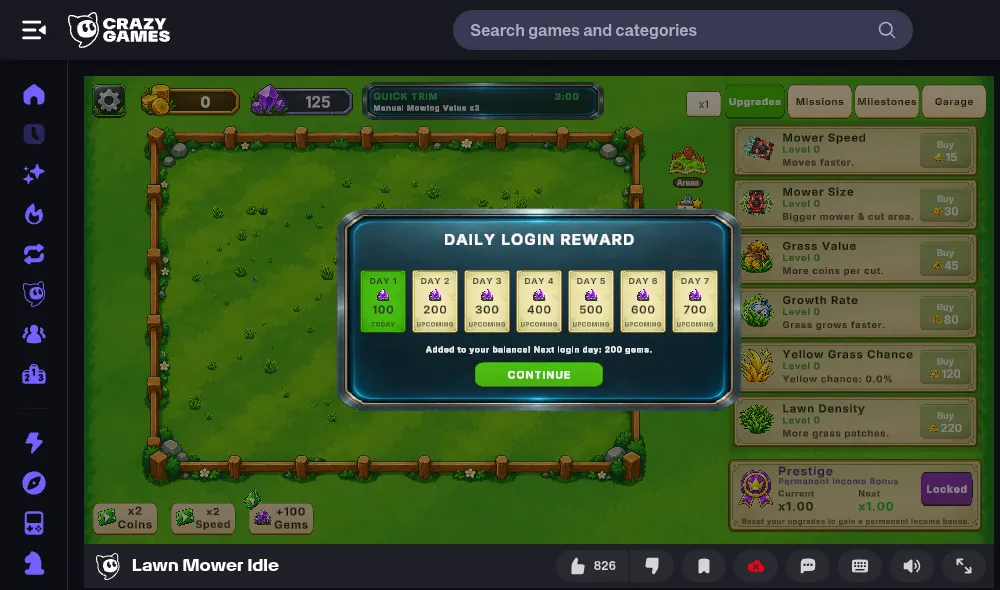
- Collect the Daily Login Reward that pops up on first launch — 100 Gems on day 1.
- Hold the left mouse button on the mower and drag it across the grass. Each cut patch pays Gold.
- Spend your first Gold in the Upgrades tab on the right.
- Keep mowing manually until automation is available, then let the Auto Mowers do the work.
The screen has four tabs — Upgrades, Missions, Milestones, Garage — plus an x1 buy-amount button, an Areas button on the lawn, and a settings cog. In our session a timed Quick Trim event was running ("Manual Mowing Value x3" for 3:00), which is the best moment to mow by hand. At the bottom left are three boost buttons — x2 Coins, x2 Speed and +100 Gems — marked with a play icon, which on CrazyGames usually means an optional rewarded video.
Controls
| Input | Action |
|---|---|
| Left mouse button (hold and drag) | Move the lawn mower to mow manually |
| Mouse click | Buy upgrades, switch tabs, use boosts and menus |
There are no keyboard shortcuts on the official listing. A mouse is far more comfortable than a touchpad for long manual mowing sessions.
Every starting upgrade explained
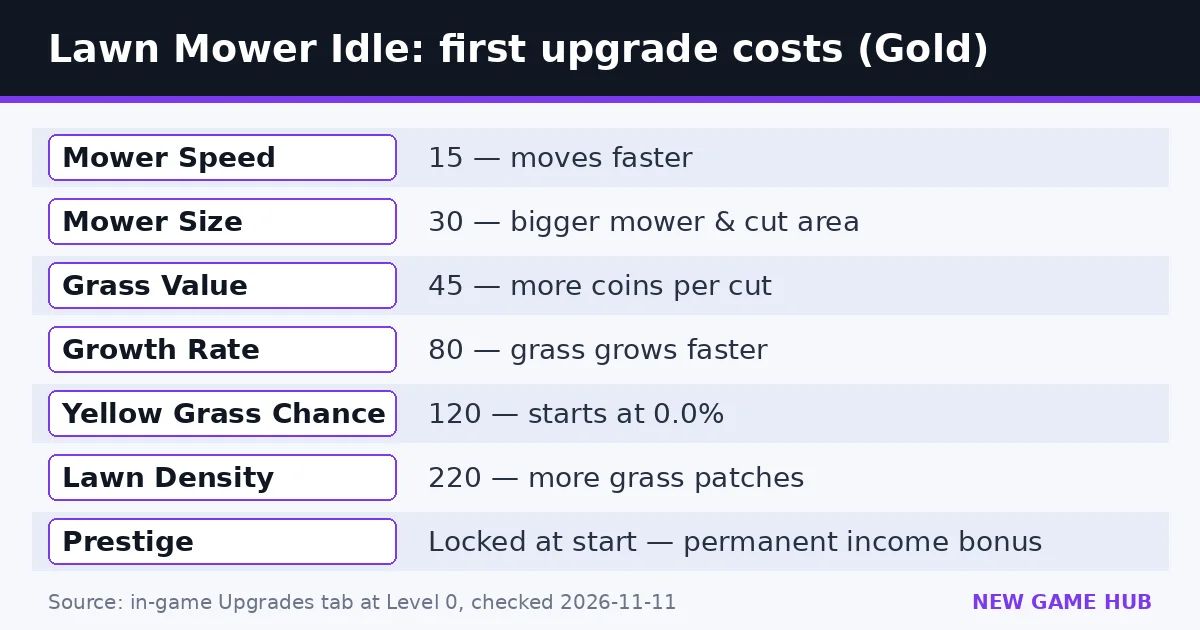
These are the six upgrades in the Upgrades tab at Level 0, with the starting costs we saw. Costs rise each time you buy a level, as is normal in idle games.
| Upgrade | Starting cost | Effect (in-game text) | Why it matters |
|---|---|---|---|
| Mower Speed | 15 Gold | Moves faster | More grass per second while you drag |
| Mower Size | 30 Gold | Bigger mower and cut area | Each pass cuts a wider strip |
| Grass Value | 45 Gold | More coins per cut | Multiplies everything else |
| Growth Rate | 80 Gold | Grass grows faster | Less waiting for regrowth |
| Yellow Grass Chance | 120 Gold | Yellow chance (starts at 0.0%) | Unlocks the valuable Yellow Grass |
| Lawn Density | 220 Gold | More grass patches | More to cut on every pass |
Below the list sits Prestige: "Permanent Income Bonus — Reset your upgrades to gain a permanent income bonus." It is locked at the start and showed Current x1.00 / Next x1.00 in our session.
An efficient upgrade order
Idle games reward balanced growth. This order follows how the upgrades multiply each other:
- Mower Size and Mower Speed first. They are the cheapest and make manual mowing — your only income at the start — much faster.
- Grass Value next. It multiplies every patch you cut, including future Auto Mower cuts.
- Growth Rate once you notice yourself waiting for grass to grow back.
- Yellow Grass Chance as soon as you can afford it. The official description singles out Yellow Grass as valuable, and the chance starts at 0%.
- Lawn Density when the lawn feels empty between passes.
- Auto Mowers whenever they become available — they keep earning while you are not dragging, and offline.
A simple rule: buy whichever upgrade is cheapest relative to your current Gold, but never let Grass Value fall far behind the others. Use the x1 button to switch buy amounts once you have Gold to spare.
Gems, missions, milestones and the Garage
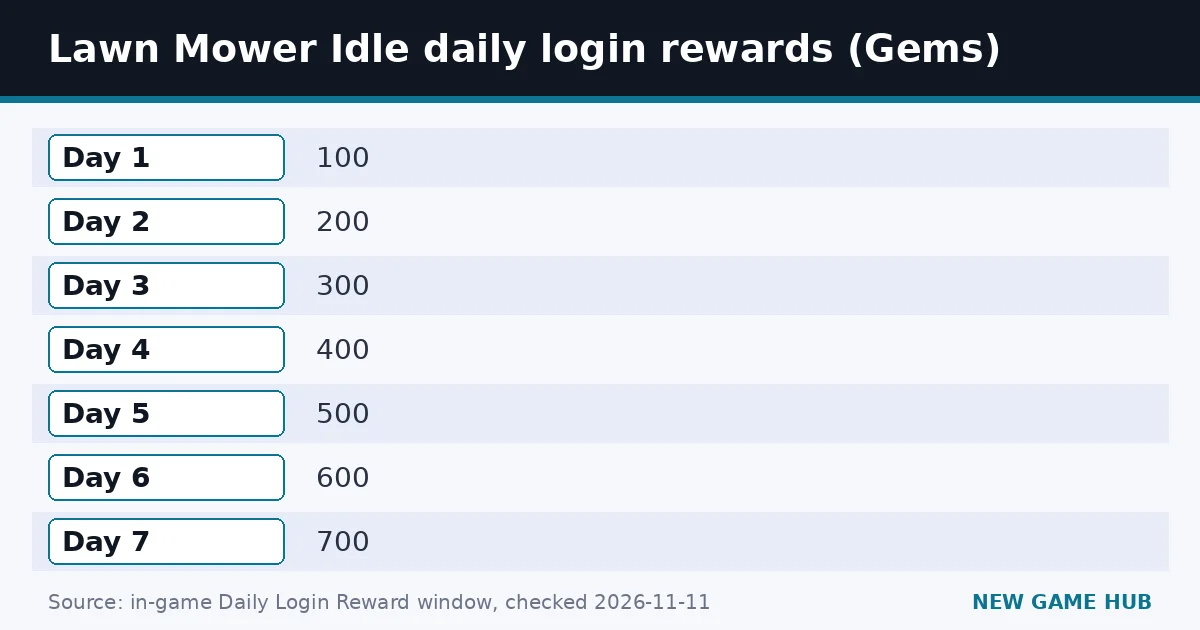
- Gems are the second currency (we started with 125). The Daily Login Reward pays 100 Gems on day 1, rising by 100 each day to 700 on day 7, so logging in for a week is worth 2,800 Gems.
- Missions are short goals that point you at the next thing to do.
- Milestones reward long-term progress.
- Garage is where you manage mowers; the official description also mentions installing Mower Parts for more power.
- Areas (the map icon on the lawn) suggests new lawns to unlock as you progress.
Prices for Gems purchases and the exact contents of the Garage can change in updates, so check the in-game shop before spending.
When should you prestige?
Prestige resets your upgrades in exchange for a permanent income bonus. The preview shows your current multiplier and what the next one would be. A good rule of thumb for this genre: prestige when the Next multiplier is clearly higher than Current and your progress has slowed to a crawl. Prestiging the moment the button unlocks gives a tiny bonus for a big reset.
The official page does not publish the prestige formula, so watch the preview numbers rather than following a fixed Gold target.
Beginner mistakes
- Skipping the daily reward and losing the 7-day streak.
- Spending everything on Mower Speed and ignoring Grass Value.
- Leaving Yellow Grass Chance at 0%.
- Prestiging too early for a near-zero bonus.
- Mowing by hand outside events — save your effort for Quick Trim windows.
- Trying to play on a phone: CrazyGames lists the game as desktop-only.
Lawn Mower Idle codes
Last checked: 11 November 2026. There are no redeem codes for Lawn Mower Idle. We did not see a code box in the game, and the CrazyGames listing does not mention codes. Free Gems come from the daily login track, missions and milestones.
Lawn Mower Idle vs similar idle games
| Game | Core action | Automation | Platform |
|---|---|---|---|
| Lawn Mower Idle | Drag a mower over grass | Auto Mowers | Desktop browser (CrazyGames) |
| Mowing simulators on mobile | Tap or steer a mower | Varies | Phone apps |
| Cookie Clicker-style idlers | Click a single object | Buildings | Browser |
Lawn Mower Idle sits between a clicker and an idle game: hands-on at the start, mostly automatic later.
Platforms and system requirements
Lawn Mower Idle runs in desktop browsers only on CrazyGames. It is built in Unity 6 and loaded smoothly in desktop Chrome in our test. No official system requirements are published. Progress is saved through the game and your CrazyGames session; log in to CrazyGames if you want the best chance of keeping your save across devices.
FAQ
What should I upgrade first in Lawn Mower Idle?
Start with Mower Size (30 Gold) and Mower Speed (15 Gold) to speed up manual mowing, then Grass Value (45 Gold), which multiplies all income.
What does Yellow Grass do?
Yellow Grass is the valuable grass highlighted in the official description. Its spawn chance starts at 0.0% and rises with the Yellow Grass Chance upgrade (first level costs 120 Gold).
What is Prestige in Lawn Mower Idle?
Prestige resets your upgrades to give a permanent income bonus. It is locked at the start and shows the current and next multiplier.
How much are the daily login rewards?
100 Gems on day 1, then 200, 300, 400, 500, 600 and 700 Gems on days 2 to 7.
Can I play Lawn Mower Idle on mobile?
No. CrazyGames lists it as desktop-only.
Does Lawn Mower Idle earn offline?
Yes. The official description says you keep earning rewards while you are offline.
Are there codes?
No. As of 11 November 2026 the game has no code system.
Related guides
 Snow Plow Tycoon guide
 Goods Triple Match 3D guide
 Paint to Hide guide
 Toy Repair Shop guide
 The Last Ember guide
 Country Balls World War guide
- Snow Plow Tycoon guide — The 97% rule, all 9 levels, 12 plows, seasons and controls.
- Goods Triple Match 3D guide — Group three identical 3D goods to clear the shelves before time runs out — how it works and how to beat crowded levels.
- Paint to Hide guide — Paint yourself to match the scenery, lock in place, and outlast the hunters — controls and tips for both sides.
- Toy Repair Shop guide — Repair, clean and customize customers’ toys in a cozy workshop — how the loop works plus tips and decorating ideas.
- The Last Ember guide — A free browser survivors-like: auto-attacks, five-minute runs, evolutions, three heroes and three endings.
- Country Balls World War guide — Pick a country, drag your army onto your neighbors, and try to hold the whole globe — controls, tips and what to avoid.
Sources: CrazyGames — Lawn Mower Idle · In-game Upgrades tab and Daily Login Reward, checked 11 Nov 2026
Unofficial fan guide, not affiliated with CrazyGames or the game's developer. Screenshot used under the CrazyGames content-creation license with the platform visible.