Reboot Shop: Gadget Repair — Controls and How Repairs Work
Reboot Shop: Gadget Repair is a free repair-shop simulator on CrazyGames. You fix phones, controllers, headphones and handheld consoles: unscrew cases, disconnect cables, clean dusty parts and replace damaged ones. Click or tap to interact, hold on screws to loosen or tighten them, drag parts to move them, and use R to flip the device, H for repair help and the mouse wheel to zoom. The Daily Mystery Crate hides two faults. It launched in November 2026 and was rated 9.0 from 1,038 votes (11 Nov 2026).
Quick facts
| Genre | Simulation / repair shop |
|---|---|
| Released | November 2026 |
| Platforms | Browser (desktop, mobile, tablet), CrazyGames app (iOS, Android) |
| Controls | Click/tap, hold on screws, drag; R flip, H help, wheel zoom |
| CrazyGames rating | 9.0 (932 likes / 106 dislikes, 11 Nov 2026) |
| Official site | Play free on CrazyGames |

Where to play
Play Reboot Shop on CrazyGames
CrazyGames does not provide embeds for other sites, so we link to the official page.
What is Reboot Shop?
Reboot Shop: Gadget Repair is a hands-on repair simulation where you run a neighborhood shop and bring phones, controllers, headphones and handheld consoles back to life. It was released in November 2026 and last updated on 10 November 2026. At our 11 November 2026 check it had 932 likes and 106 dislikes (rating 9.0).
How a repair works
- Diagnose the problem.
- Unscrew the case and disconnect cables.
- Clean dusty components with the brush.
- Replace damaged parts.
- Power it on and hand it back to a happy customer.
Spend earnings on better tools and shop upgrades, meet returning customers, and buy broken gadgets from the market to restore for profit, or keep rare restorations in your showcase.
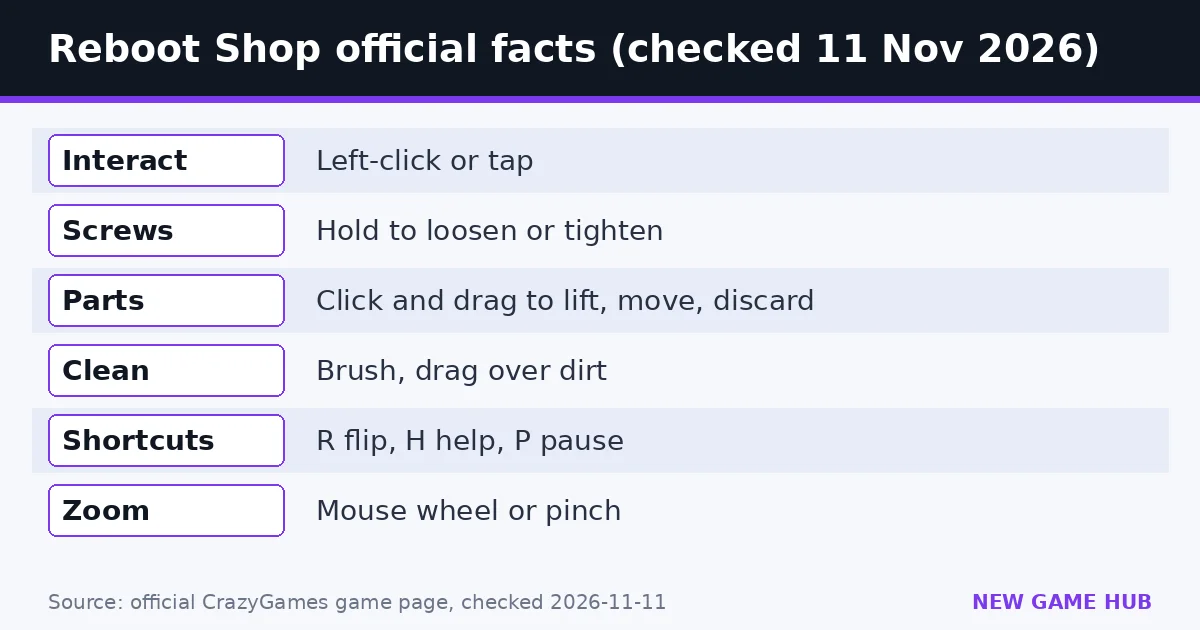
Reboot Shop controls
- Left-click or tap: interact with gadgets, tools and menus
- Hold on screws: loosen or tighten
- Click and drag: lift parts, move components or discard broken pieces
- Brush + drag: clean dirty components
- Mouse wheel or two-finger pinch: zoom the workbench
- R: flip the device
- H: open repair help
- P: pause or resume
- Mobile: on-screen buttons for flip, help and pause
Tools are selected automatically by default; manual selection is in settings.
The Daily Mystery Crate
The Daily Mystery Crate is a fresh challenge each day with two hidden faults to uncover.
Tips from the official page
- Press H when you’re stuck on a fault.
- Flip with R to reach screws and parts on the back.
- Flip market gadgets for profit once you have better tools.
- Expect two faults in the Daily Mystery Crate, so keep checking after the first fix.
Are there Reboot Shop codes?
No. The official page lists no codes or cheats.
FAQ
What are the controls in Reboot Shop?
Click or tap to interact, hold on screws, drag parts, brush to clean, wheel or pinch to zoom, R to flip, H for help, P to pause.
How do you get help on a repair?
Press H to open repair help.
What is the Daily Mystery Crate?
A daily challenge with two hidden faults to uncover.
What can you repair in Reboot Shop?
Phones, controllers, headphones and handheld consoles.
Related guides
 Toy Repair Shop guide
 My Trading Card Shop guide
 Coconut Tycoon guide
 Platypus Coffee guide
 Country Balls World War guide
 Nuke Policy guide
- Toy Repair Shop guide — Repair, clean and customize customers’ toys in a cozy workshop — how the loop works plus tips and decorating ideas.
- My Trading Card Shop guide — Official 2million and BETA codes checked 11 Nov 2026, plus packs, grading, trading and the 10% friends bonus.
- Coconut Tycoon guide — Stand, restaurant, factory: the official progression and controls.
- Platypus Coffee guide — Official cafe loop, controls and staff and expansion tips for Poki’s cozy platypus cafe sim.
- Country Balls World War guide — Pick a country, drag your army onto your neighbors, and try to hold the whole globe — controls, tips and what to avoid.
- Nuke Policy guide — Spread out, build cities and factories, and hold 85% of the map before the bots — with real build costs from our test game.
Sources: CrazyGames — Reboot Shop (official game page)
Unofficial fan guide. Reboot Shop is published on CrazyGames. We are not affiliated with CrazyGames or the developer.