Messy Mart: How to Play, Controls, Powers and Upgrades
Messy Mart is a free 3D sorting game by NCY INTERACTIVE on CrazyGames. The supermarket is a mess: you play an employee who picks up scattered products and takes each to the right shelf or fridge across 11 aisles, 90 shelves and 22 fridges. Earn coins to carry more, move faster and grab from farther away, and unlock powers like the Magnet. Move with WASD, pick up with left-click or E, open the store plan with M. It launched in November 2026 and was rated 9.1 from 486 votes (11 Nov 2026).
Quick facts
| Developer | NCY INTERACTIVE |
|---|---|
| Genre | Arcade / sorting / 3D |
| Released | November 2026 |
| Platforms | Browser (desktop, mobile, tablet), CrazyGames app (iOS, Android) |
| Store | 11 aisles, 90 shelves, 22 fridges |
| CrazyGames rating | 9.1 (440 likes / 46 dislikes, 11 Nov 2026) |
| Official site | Play free on CrazyGames |

Where to play
CrazyGames does not provide embeds for other sites, so we link to the official page.
What is Messy Mart?
“The supermarket is a mess!” Products are scattered across the floor, some are in the wrong aisles, and the shelves need restocking. You step in as an employee and turn the chaos into a neatly organized market. Messy Mart is by NCY INTERACTIVE, released in November 2026. At our 11 November 2026 check it had 440 likes and 46 dislikes (rating 9.1).
How to play
- Explore 11 aisles, stock 90 shelves and fill 22 fridges.
- Pick up products and take them to the right shelf or fridge.
- Follow the arrows and on-screen hints, or open the store plan to see what still needs attention.
- Tidy the aisles in the suggested order, or roam freely and choose your own route.
- Earn coins as you tidy and spend them on upgrades.
You can only carry a few products at first, so plan your trips.
Messy Mart controls
Desktop
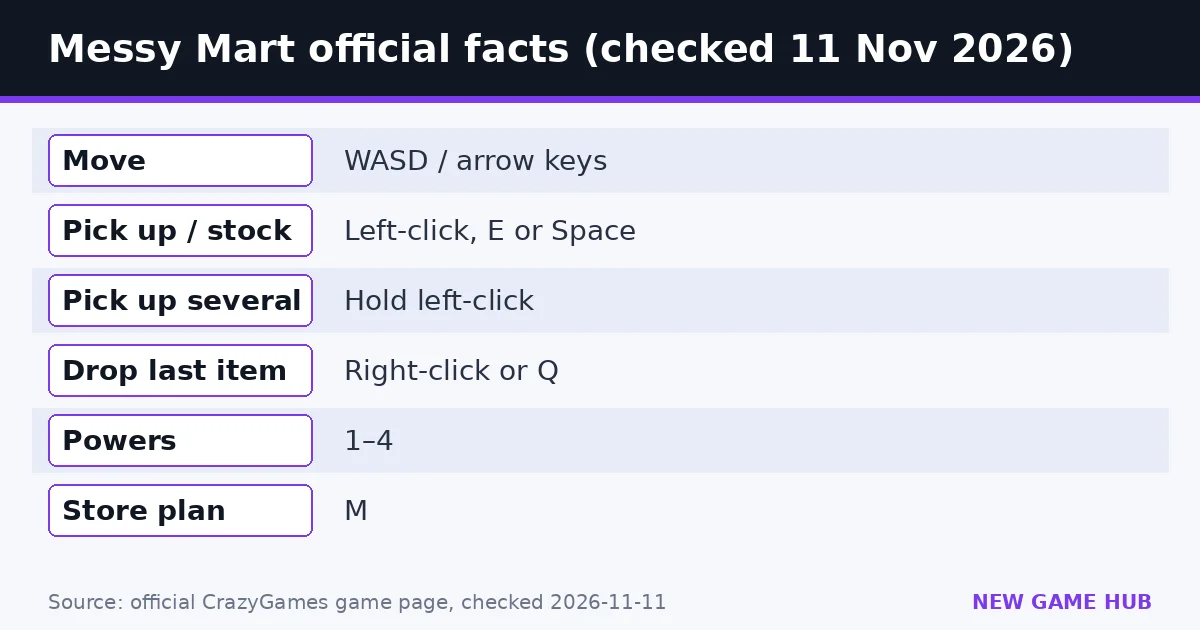
- WASD / arrow keys: move
- Mouse: look around
- Left-click: pick up a product or stock a shelf
- Hold left-click: pick up several products in a row
- E / Space: pick up or stock a shelf
- Right-click / Q: drop the last item you picked up
- 1–4: use powers
- U: open or close upgrades
- C: carrying-capacity upgrade
- M: store plan
- N: toggle sound · P: pause · Tab: toggle mouse lock
Mobile
- Drag the left side of the screen to move, the right side to look around
- Aim the center ring at a product and tap GRAB
- Face a shelf and tap PLACE
- Tap the down arrow to drop an item
Upgrades and powers
Upgrades let you carry more, move faster, or grab products from farther away. You can also get a shopping cart to carry more at once.
Powers (keys 1–4) unlock as you progress:
- Magnet: attract matching products
- Shelf-finder arrows
- Highlight the products you need
- Send everything you’re carrying straight to its shelf
Tips
- Buy carrying capacity (C) early, since few items fit at first.
- Press M to see which aisles still need work.
- Hold left-click to sweep up a row of products.
- Save the send-to-shelf power for full loads.
Are there Messy Mart codes?
No. The official page lists no codes or cheats.
FAQ
How do you play Messy Mart?
Pick up scattered products and take each to the right shelf or fridge until all 11 aisles are in order.
How do you open the store plan?
Press M.
How do you drop an item?
Right-click or Q on desktop; tap the down arrow on mobile.
What powers are in Messy Mart?
Magnet, shelf-finder arrows, product highlight, and sending everything you carry straight to its shelf, used with keys 1–4.
Who made Messy Mart?
NCY INTERACTIVE.
Related guides
 Swanny’s Grocery guide
 My Trading Card Shop guide
 Coconut Tycoon guide
 Goods Triple Match 3D guide
 Country Balls World War guide
 Nuke Policy guide
- Swanny’s Grocery guide — Crops, shelves, the till, 5 store levels and every control.
- My Trading Card Shop guide — Official 2million and BETA codes checked 11 Nov 2026, plus packs, grading, trading and the 10% friends bonus.
- Coconut Tycoon guide — Stand, restaurant, factory: the official progression and controls.
- Goods Triple Match 3D guide — Group three identical 3D goods to clear the shelves before time runs out — how it works and how to beat crowded levels.
- Country Balls World War guide — Pick a country, drag your army onto your neighbors, and try to hold the whole globe — controls, tips and what to avoid.
- Nuke Policy guide — Spread out, build cities and factories, and hold 85% of the map before the bots — with real build costs from our test game.
Sources: CrazyGames — Messy Mart (official game page)
Unofficial fan guide. Messy Mart is developed by NCY INTERACTIVE and published on CrazyGames. We are not affiliated with either.