Swanny’s Grocery: How to Play, Controls and Store Levels
Swanny’s Grocery is a free supermarket tycoon on CrazyGames where you play Swanny, a little white swan. Grow crops like pondweed, sweetcorn and water lily seeds, stack them on your head, fill the shelves and serve swan shoppers at the till. Spend coins on crops, checkouts, shelves and speed, hire helper swans, and grow through five store levels to Swanny’s Mega Grocery and a Grand Opening. Move with WASD or the arrows, or drag on mobile; most actions happen just by walking next to things. It launched in November 2026 and was rated 9.1 from 213 votes (11 Nov 2026).
Quick facts
| Genre | Simulation / tycoon |
|---|---|
| Released | November 2026 |
| Platforms | Browser (desktop, mobile, tablet), CrazyGames app (iOS, Android) |
| Controls | WASD / arrows or drag; walk next to things to act |
| Content | 5 store levels, 10 products, 4 helper types, 8 upgrades, 45 outfits |
| CrazyGames rating | 9.1 (194 likes / 19 dislikes, 11 Nov 2026) |
| Official site | Play free on CrazyGames |

Where to play
Play Swanny’s Grocery on CrazyGames
CrazyGames does not provide embeds for other sites, so we link to the official page.
What is Swanny’s Grocery?
“Waddle, Stock & Shop!” You run the cutest supermarket in town as Swanny, a little white swan with a big dream. It was released in November 2026 and saves progress automatically. At our 11 November 2026 check it had 194 likes and 19 dislikes (rating 9.1).
How to play
- Grow crops: pondweed, duckweed, sweetcorn, peas, lettuce, oats, wheat, watercress, aquatic plants and water lily seeds (10 products).
- Waddle over to pick them, stack them on your head, and fill the shelves.
- Serve swan shoppers at the till and collect coins. Fancy VIP shoppers leave tips.
- Spend coins on new crops, extra checkouts, bigger shelves and faster waddling (8 upgrades).
- Hire helper swans (4 types) to harvest, stock and work the tills.
- Grow through 5 store levels, from Little Swanny Grocery to Swanny’s Mega Grocery, and throw a Grand Opening to win.
Swanny’s Grocery controls
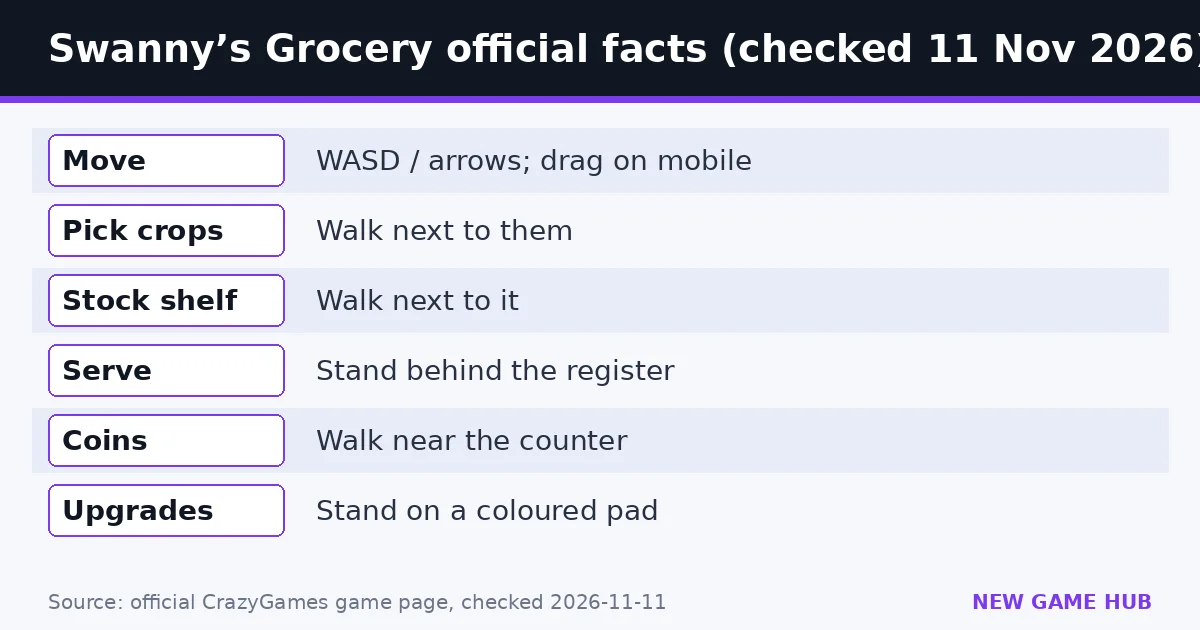
Desktop: WASD or arrow keys to move Swanny; mouse for buttons and menus.
Mobile: touch and drag anywhere to move; tap buttons and menus.
On both:
- Walk next to crops to pick them up automatically
- Walk next to a shelf to stock it automatically
- Stand behind the register to serve shoppers
- Walk near the counter to collect coins
- Stand on a coloured pad to buy upgrades and unlock areas
- Walk onto the pink rug to open the Dressing Room
Dressing Room and outfits
The Dressing Room has 45 outfits and accessories, including bows, crowns, hoodies, princess dresses, a chef outfit and a Golden Swan Outfit, plus 6 feather colours.
Are there Swanny’s Grocery codes?
No. The official page lists no codes or cheats.
FAQ
How do you win Swanny's Grocery?
Grow from Little Swanny Grocery through five store levels to Swanny's Mega Grocery and throw a Grand Opening.
How do you serve customers?
Stand behind the register.
How do you buy upgrades?
Stand on a coloured pad.
How do you change Swanny's outfit?
Walk onto the pink rug to open the Dressing Room, with 45 outfits and accessories and 6 feather colours.
What are the controls?
WASD or arrow keys on desktop, touch and drag on mobile; most actions happen by walking next to things.
Related guides
 Messy Mart guide
 Coconut Tycoon guide
 Platypus Coffee guide
 Cat Ghost Hunter guide
 My Trading Card Shop guide
 Country Balls World War guide
- Messy Mart guide — 11 aisles, every control, powers, upgrades and the store plan.
- Coconut Tycoon guide — Stand, restaurant, factory: the official progression and controls.
- Platypus Coffee guide — Official cafe loop, controls and staff and expansion tips for Poki’s cozy platypus cafe sim.
- Cat Ghost Hunter guide — The official catch-sell-upgrade loop, controls and what coins buy.
- My Trading Card Shop guide — Official 2million and BETA codes checked 11 Nov 2026, plus packs, grading, trading and the 10% friends bonus.
- Country Balls World War guide — Pick a country, drag your army onto your neighbors, and try to hold the whole globe — controls, tips and what to avoid.
Sources: CrazyGames — Swanny’s Grocery (official game page)
Unofficial fan guide. Swanny’s Grocery is published on CrazyGames. We are not affiliated with CrazyGames or the developer.