Pixel Z controls: special moves, transformations and ELO
Pixel Z is a 2D pixel-art fighter on Roblox. Use U, I and O for light, medium and heavy attacks; H charges ki and T transforms your fighter. For character-specific moves, press P and open List of Movements.
Looking for rewards? See all Pixel Z codes and redemption instructions.
Quick facts
| Developer | That One Fighting Game |
|---|---|
| Platform | Roblox |
| Server size | 100 players |
| Official site | Official Roblox experience and description |
Where to play
Pixel Z keyboard controls
The developer publishes the following keyboard layout. The game also supports phones, tablets and controllers; these keys describe the keyboard layout only.
| Action | Key |
|---|---|
| Move / jump | W, A, S, D |
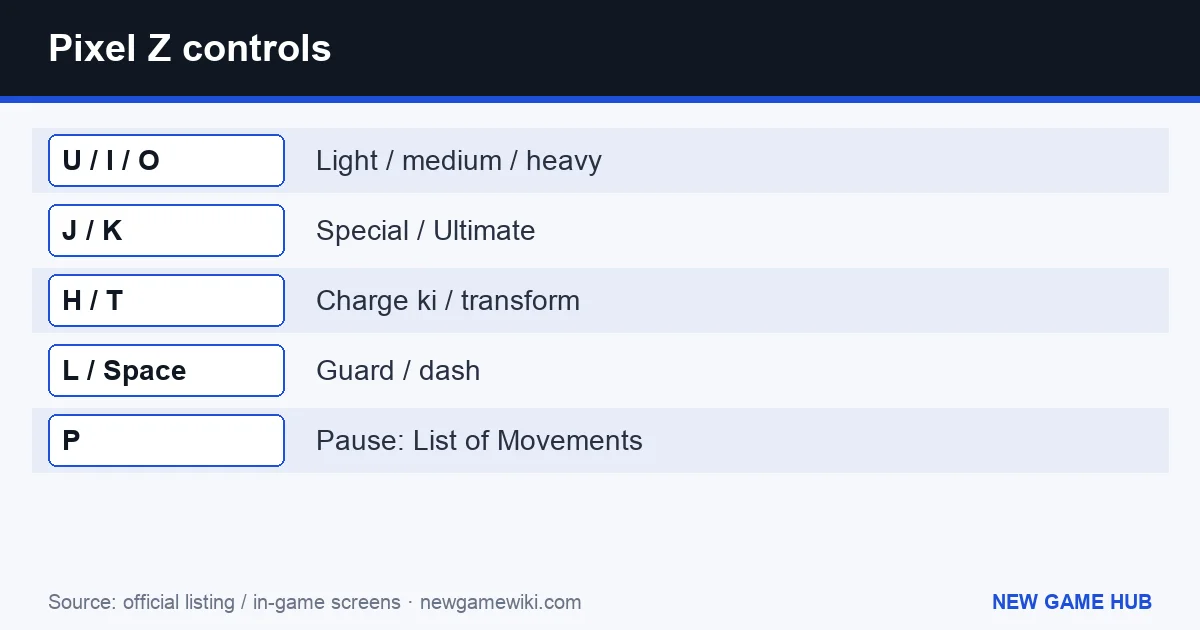
| Light / medium / heavy attack | U / I / O |
| Special / Ultimate | J / K |
| Guard | L |
| Dash | Space |
| Charge ki | H |
| Dragon Rush | E |
| Transform | T |
| Pause | P |
How to find special moves and transformations
Special moves use a direction held with J, or Q + J, according to the official instructions. Open Pause → List of Movements for the full move list. This is the useful reference when the basic J input is not the move you want.
H and T have separate jobs: H charges ki; T triggers transformation. The public description does not give character-by-character ki costs or transformation conditions, so check the move list and tutorial for your selected fighter.
Tutorial, CPU fights or ranked ELO?
The built-in tutorial introduces the controls. CPU fights provide an alternative to online matches, while online play lets you climb the ELO rankings. ELO and Wins have global leaderboards.
For a first session, our suggested sequence is tutorial, move list, then a CPU fight to practise the inputs before trying online play. That is a learning route, not a requirement to unlock ranked matches.
How do you unlock more fighters?
The developer advertises more than 40 unlockable fighters and booster packs that contain new fighters. Exact pack odds, prices and a best-character ranking are not provided in the checked description. Use the in-game pack information before deciding what to open.
Where to find Pixel Z codes
Pixel Z has 1 active official code, last checked 18 November 2026.
FAQ
Where is the Pixel Z move list?
Press P to pause, then open List of Movements.
How do I charge ki and transform?
On keyboard, H charges ki and T is the transformation input. Individual requirements are not stated in the public description.
Can I play Pixel Z on a controller?
Yes. The developer lists controller, phone and tablet support as well as keyboard controls.
Related guides
Pixel Z codes STAND OUT guide
 Technical Ragdoll MMA guide
 Do Not Stop guide
 Net a Fish guide
 Be a Soccer Legend guide
- Pixel Z codes — Official, date-checked codes.
- STAND OUT guide — The official STAND OUT keyboard layout: sprint, dash, block, summon, pose, pilot mode and camera lock, with a compact controls reference.
- Technical Ragdoll MMA guide — Technical Ragdoll MMA has 1 active official code, last checked 16 November 2026.
- Do Not Stop guide — Do Not Stop has 6 active official codes, last checked 16 November 2026.
- Net a Fish guide — Net a Fish has 7 active official codes, last checked 16 November 2026.
- Be a Soccer Legend guide — Be a Soccer Legend has 1 active official code, last checked 16 November 2026.
Sources: Official Roblox experience and description
Independent guide to Pixel Z. We are not affiliated with its developer or Roblox.